

OUSON HEALTH · STEP BY STEP
Review History and remove an incorrect record
Switch measurement types, compare seven- and thirty-day trends, browse months and check individual records.
See the full original example screen
Choose the measurement you want to review
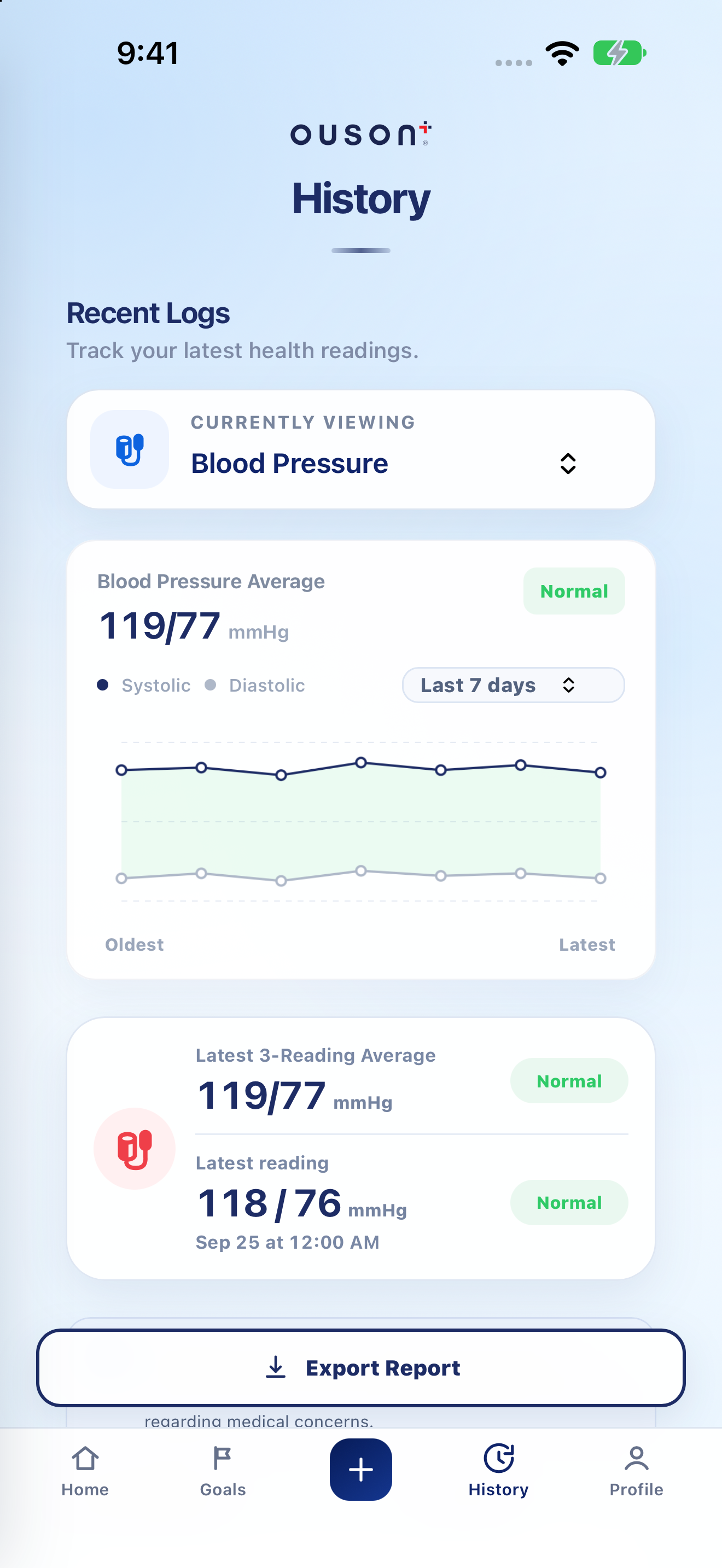
Tap History, then use Currently viewing to select the measurement type. The chart and record list follow this selection.
Open original screenshot ↗
Switch the chart period
Use the chart’s Last 7 days / Last 30 days control to change the trend period. Read the chart labels and units. A period average is different from an individual saved measurement.
Open original screenshot ↗
Separate the latest reading from the BP average
For blood pressure, compare Latest reading with Latest 3-Reading Average. They are different summaries; do not treat the average as another measurement taken at the latest timestamp.
Open original screenshot ↗
Scroll to the monthly record list
Use the month control in the records area to browse saved entries for another month. Read each entry’s date, time, value, unit and available notes. The monthly list and the chart period are separate controls.
Remove an entry only after checking it
For an incorrect entry, tap its delete/trash control and read the confirmation. Confirm only the intended record. To replace it, add the correct value with the original measurement date/time, then verify it in History.
The highlighted screenshot is the top of History; the record list and delete controls are below it. Export important records before removing them if you need to retain a copy.
Open a report when you need a copy
Tap Export Report to choose a report period and measurement. Follow the PDF and sharing guide for the next steps.
Open original screenshot ↗
IF YOU NEED A HAND
Questions and quick checks
Why is the monthly list different from the chart?
The list is selected by month, while the trend chart uses its selected seven- or thirty-day period. Check both controls.
I cannot find a record I just entered.
Check the account, measurement type and the month of its recorded date. If the save did not complete, resolve the connection or error before trying again.
OUSON Health helps you record and review measurements. It does not provide medical diagnosis or treatment. Values and ranges in teaching screenshots are examples, not recommended personal targets.