

OUSON HEALTH · STEP BY STEP
Export and share a PDF health report
Choose one measurement and a date range, review the report and select where to save or share it.
See the full original example screen
Open Export Report from History
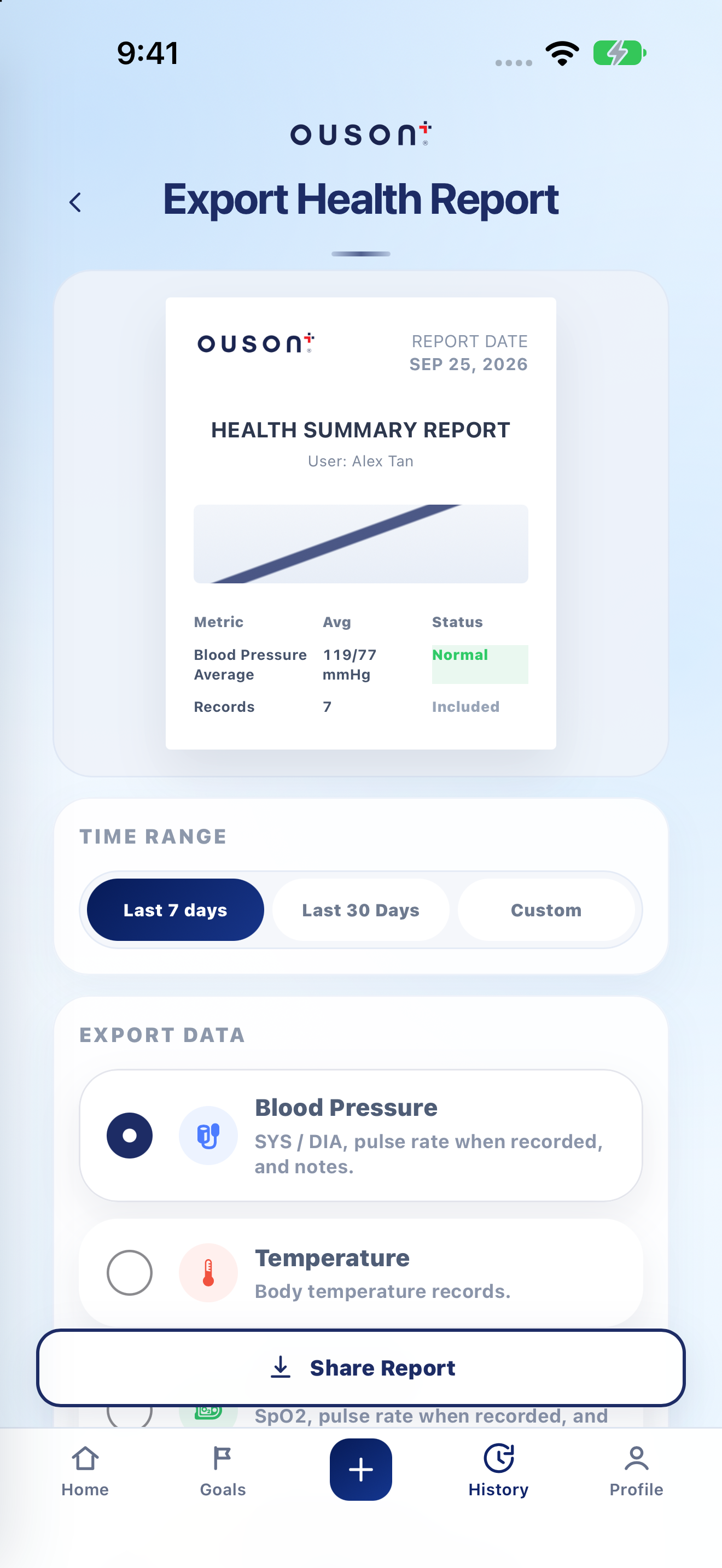
In History, tap Export Report. The Export Health Report page shows a preview and the available report options.
Choose the report period
Select Last 7 Days, Last 30 Days or Custom. For Custom, set From and To to the intended dates. Check that the period contains the records you want to include.
Open original screenshot ↗
Select one measurement type
Under Export Data, select Blood Pressure, Temperature, Blood Oxygen, Blood Glucose or Weight. This report exports the selected measurement; choose another type for a separate report.
Open original screenshot ↗
Review the report before sharing
Check the selected type, dates, account details and available records. A report summary or average is not a diagnosis. If the period is empty, check History and the date range before generating the report again.
Open original screenshot ↗
IF YOU NEED A HAND
Questions and quick checks
Can I send all five types in one selected report?
The current report selector chooses one measurement type at a time. Generate another report after changing the selection.
Why do I not see a particular sharing app?
The system sharing sheet depends on installed apps and device settings. Check More if available, or save the PDF using an available destination.
OUSON Health helps you record and review measurements. It does not provide medical diagnosis or treatment. Values and ranges in teaching screenshots are examples, not recommended personal targets.