

OUSON HEALTH · STEP BY STEP
Manage your profile, language and account
Update personal details, choose a language and find password, sign-out and account-deletion controls.
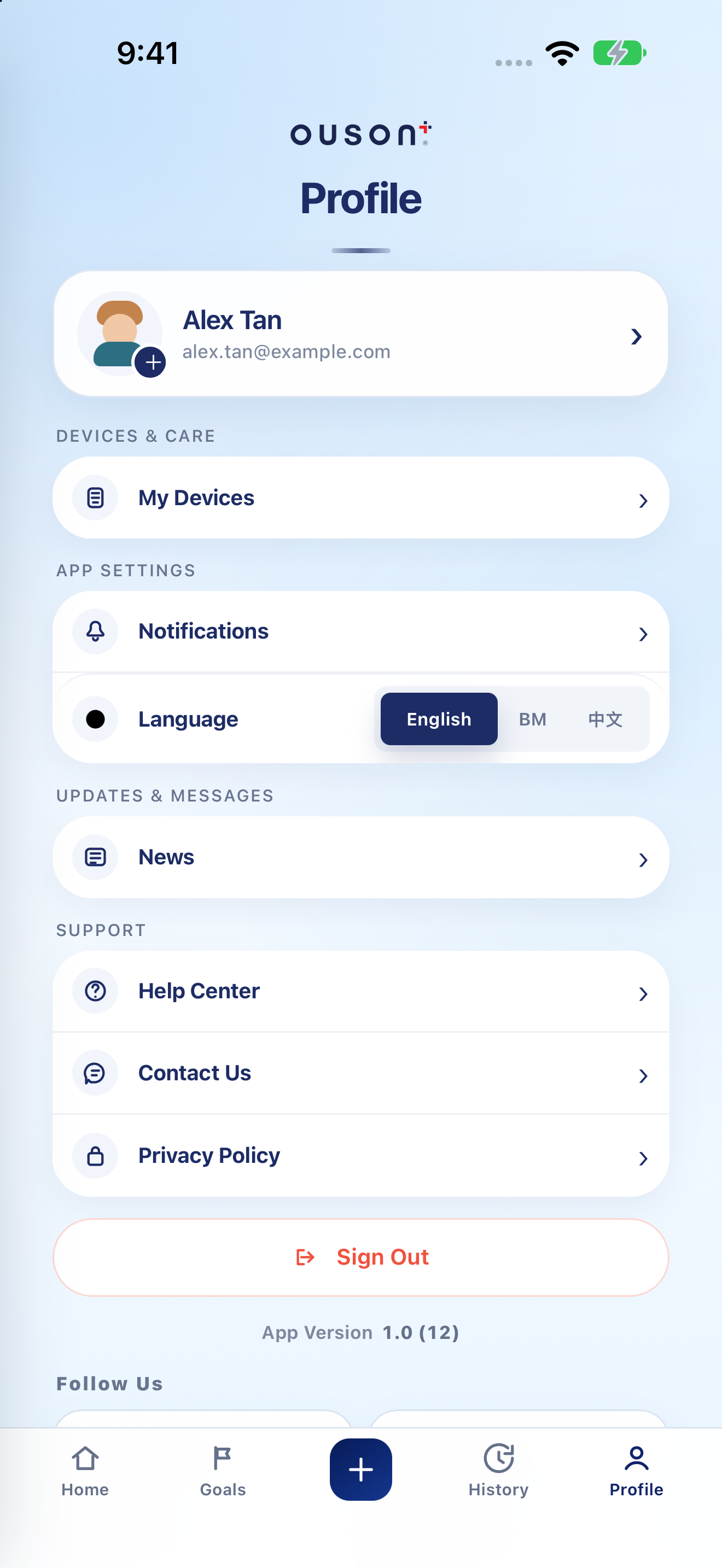
See the highlights on the full example screen
 12356
12356
Open your personal information
Tap Profile, then your name/account card. On Profile Settings, update the supported personal details such as name, mobile number, date of birth or gender. The displayed sign-in email is not editable in this form. Tap Save Changes and check the result.
Open original screenshot ↗
Change the profile photo
Use the photo action or Change Photo. Choose your image and, if shown, adjust the crop and tap Apply. Complete any Save Changes step shown and check the updated profile.
Open original screenshot ↗
Choose English, BM or 中文
In Profile, use Language to choose English, Bahasa Melayu (BM) or Chinese (中文). The app’s labels update to your chosen language; the tutorials on this website use English button names.
Open original screenshot ↗
Change a password with account verification
Open the personal-information card → Account Management → Change Password. Request the verification code for the account email, enter it, then enter and confirm the new password. Follow the rules shown and tap Update Password. Never share the code or password.
Read the privacy information or request deletion
Open Privacy Policy in Profile to read the app’s data information. If you intend to permanently delete the account, go to Profile Settings → Account Management → Delete Account. Read the consequences and complete the required email verification and confirmation only if you wish to proceed.
Account deletion is different from signing out. Export any records you need before proceeding; do not use Delete Account to troubleshoot sign-in.
Open original screenshot ↗
Sign out when you are finished
Tap Sign Out in Profile. To return to existing records, sign in with the same account and method. The App Version shown here can help support identify your installed build.
Open original screenshot ↗
IF YOU NEED A HAND
Questions and quick checks
Can I change the sign-in email here?
No. Profile Settings labels the sign-in email as not changeable in that form. Contact support if you need help with account access.
Is Sign Out the same as Delete Account?
No. Sign Out ends the current signed-in session. Delete Account is a separate permanent-deletion flow with its own verification and confirmation.
OUSON Health helps you record and review measurements. It does not provide medical diagnosis or treatment. Values and ranges in teaching screenshots are examples, not recommended personal targets.