

OUSON HEALTH · STEP BY STEP
Find your way around Home
Understand the overview, the five measurement types and the navigation at the bottom of the app.
See the full original example screen
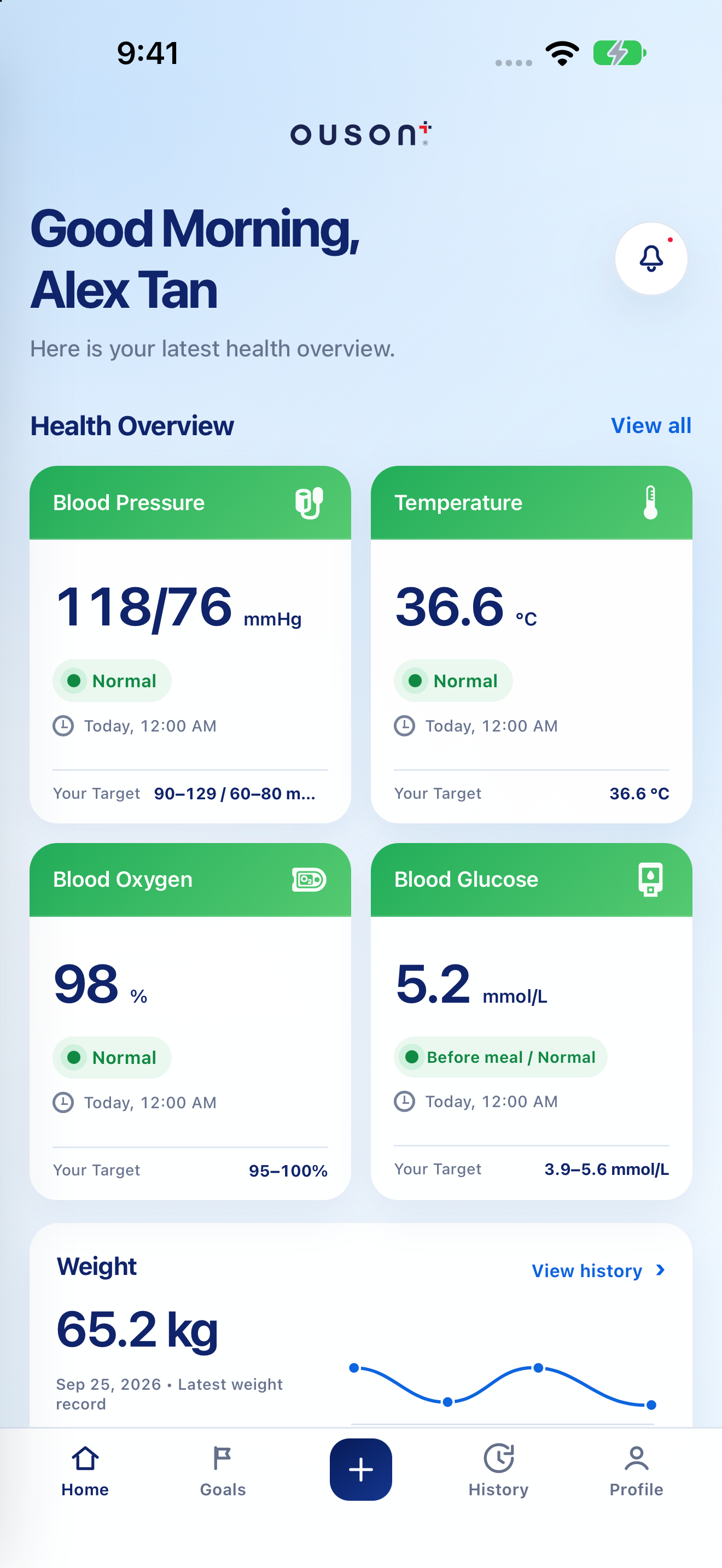
Read the latest saved overview
Home brings Blood Pressure, Temperature, Blood Oxygen, Blood Glucose and Weight together. Check the saved value, unit and recorded time; an older saved reading is not a new measurement.
Open original screenshot ↗
Look at the weight overview
Scroll to Weight for the latest saved weight and its overview. Tap View history to review weight records and trends. The app displays what you have recorded; your phone does not measure these values for you.
Open original screenshot ↗
Read labels with their context
Read the text label and unit with the colour, rather than relying on colour alone. A tracking label is not a diagnosis, and a value within a saved personal range does not establish that you are medically well. Personal targets should follow professional advice.
IF YOU NEED A HAND
Questions and quick checks
Why is there no reading on a card?
First check History for that measurement type. If none has been saved, use Add Measurement. If records should already exist, confirm the account and connection rather than entering duplicate readings.
OUSON Health helps you record and review measurements. It does not provide medical diagnosis or treatment. Values and ranges in teaching screenshots are examples, not recommended personal targets.